

流年
71,678字数 1101阅读3分40秒

先分享不带图片的代码,代码添加以下代码到主题函数文件里functions.php
- // 微博同步
- function post_to_sina_weibo($post_ID) {
- if( wp_is_post_revision($post_ID) ) return;
- $get_post_info = get_post($post_ID);
- $get_post_centent = get_post($post_ID)->post_content;
- $get_post_title = get_post($post_ID)->post_title;
- if ( $get_post_info->post_status == 'publish' && $_POST['original_post_status'] != 'publish' ) {
- $request = new WP_Http;
- $status = '【' . strip_tags( $get_post_title ) . '】 ' . mb_strimwidth(strip_tags( apply_filters('the_content', $get_post_centent)),0, 132,'...') . ' 全文地址:' . get_permalink($post_ID) ;
- $api_url = 'https://api.weibo.com/2/statuses/update.json';
- $body = array( 'status' => $status, 'source'=>'3332014706');/*3332014706指的是Key是本站的,如果你没申请就直接用这个也可以*/
- $headers = array( 'Authorization' => 'Basic ' . 'bGluZ2h1eGlhb3FpQHNpbmEuYtOnh1aGFuMwMA==' );
- /*
- bGluZ2h1eGlhb3FpQHNpbmEuYtOnh1aGFuMwMA==指的是登录新浪微博的用户名和密码,你自己到http://www.mxcz.net/tools/base64.aspx把你的帐号密码进行一下加密,格式是(username@gmail.com:password)
- */
- $result = $request->post( $api_url , array( 'body' => $body, 'headers' => $headers ) );
- }
- }
- add_action('publish_post', 'post_to_sina_weibo', 0);
有同步功能还是很方便的,代码具体在那挖来的我也忘记了,但是以下代码确实是挺好用的,因为一般的同步假如文章修改了还是会同步到微博,这代码就不会,具体效果
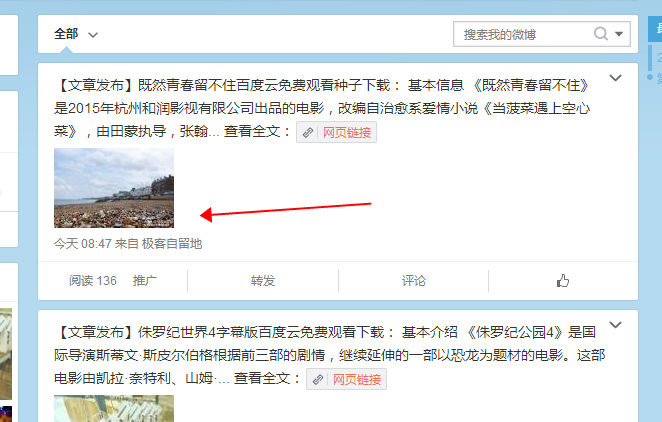
想要同步的效果,那么就必须去新浪微博开发者平台去申请个appkey,然后还要去申请个高级写入
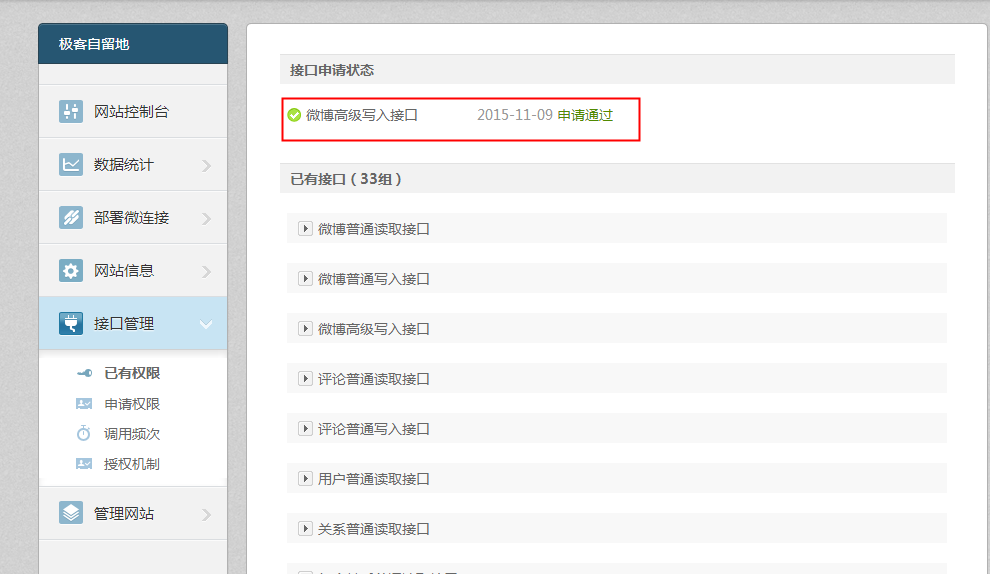
都申请完成后就可以添加以下代码到主题函数文件里functions.php
- /**
- * WordPress发布文章同步到新浪微博(带图片&自定义栏目版)
- * 文章地址:http://www.blogba.cn/sync-wordpress-with-automatic-figure-to-sina-weibo.html
- */
- function post_to_sina_weibo($post_ID) {
- /* 鉴于很多朋友反馈发布文章空白,临时加上调试代码,若无问题可删除此行,若有问题请将错误信息在本文留言即可 */
- ini_set('display_errors', true);
- /* 此处修改为通过文章自定义栏目来判断是否同步 */
- if(get_post_meta($post_ID,'weibo_sync',true) == 1) return;
- $get_post_info = get_post($post_ID);
- $get_post_centent = get_post($post_ID)->post_content;
- $get_post_title = get_post($post_ID)->post_title;
- if ($get_post_info->post_status == 'publish' && $_POST['original_post_status'] != 'publish') {
- $appkey='3332014706'; /* 此处是你的新浪微博appkey,不修改的话就会显示来自极客自留地哦! */
- $username='微博用户名';
- $userpassword='微博密码';
- $request = new WP_Http;
- $keywords = "";
- /* 获取文章标签关键词 */
- $tags = wp_get_post_tags($post_ID);
- foreach ($tags as $tag ) {
- $keywords = $keywords.'#'.$tag->name."#";
- }
- /* 修改了下风格,并添加文章关键词作为微博话题,提高与其他相关微博的关联率 */
- $string1 = '【文章发布】' . strip_tags( $get_post_title ).':';
- $string2 = $keywords.' 查看全文:'.get_permalink($post_ID);
- /* 微博字数控制,避免超标同步失败 */
- $wb_num = (138 - WeiboLength($string1.$string2))*2;
- $status = $string1.mb_strimwidth(strip_tags( apply_filters('the_content', $get_post_centent)),0, $wb_num,'...').$string2;
- /* 获取特色图片,如果没设置就抓取文章第一张图片 */
- if (has_post_thumbnail()) {
- $timthumb_src = wp_get_attachment_image_src( get_post_thumbnail_id($post_ID), 'full' );
- $url = $timthumb_src[0];
- /* 抓取第一张图片作为特色图片,需要主题函数支持 */
- } else if(function_exists('catch_first_image')) {
- $url = catch_first_image();
- }
- /* 判断是否存在图片,定义不同的接口 */
- if(!emptyempty($url)){
- $api_url = 'https://api.weibo.com/2/statuses/upload_url_text.json'; /* 新的API接口地址 */
- $body = array('status' => $status,'source' => $appkey,'url' => $url);
- } else {
- $api_url = 'https://api.weibo.com/2/statuses/update.json';
- $body = array('status' => $status,'source' => $appkey);
- }
- $headers = array('Authorization' => 'Basic ' . base64_encode("$username:$userpassword"));
- $result = $request->post($api_url, array('body' => $body,'headers' => $headers));
- /* 若同步成功,则给新增自定义栏目weibo_sync,避免以后更新文章重复同步 */
- add_post_meta($post_ID, 'weibo_sync', 1, true);
- }
- }
- add_action('publish_post', 'post_to_sina_weibo', 0);
- /*
- //获取微博字符长度函数
- */
- function WeiboLength($str)
- {
- $arr = arr_split_zh($str); //先将字符串分割到数组中
- foreach ($arr as $v){
- $temp = ord($v); //转换为ASCII码
- if ($temp > 0 && $temp < 127) {
- $len = $len+0.5;
- }else{
- $len ++;
- }
- }
- return ceil($len); //加一取整
- }
- /*
- //拆分字符串函数,只支持 gb2312编码
- //参考:http://u-czh.iteye.com/blog/1565858
- */
- function arr_split_zh($tempaddtext){
- $tempaddtext = iconv("UTF-8", "GBK//IGNORE", $tempaddtext);
- $cind = 0;
- $arr_cont=array();
- for($i=0;$i<strlen($tempaddtext);$i++)
- {
- if(strlen(substr($tempaddtext,$cind,1)) > 0){
- if(ord(substr($tempaddtext,$cind,1)) < 0xA1 ){ //如果为英文则取1个字节
- array_push($arr_cont,substr($tempaddtext,$cind,1));
- $cind++;
- }else{
- array_push($arr_cont,substr($tempaddtext,$cind,2));
- $cind+=2;
- }
- }
- }
- foreach ($arr_cont as &$row)
- {
- $row=iconv("gb2312","UTF-8",$row);
- }
- return $arr_cont;
- }
本文转载至:极客自留地




北京市 北京 5F
定时发布时,如果文章的固定链接设置成:分类ID+文章ID的话,同步到微博的链接就成了文章ID了,分类ID丢失了,这个怎么解决呢
天津市 友谊路 4F
我是代码盲,想弄又不会折腾
B1
@ 斯文败类 按照教程一步步来,就非常简单呀。。
3F
测试
广东 广州市 2F
啦啦。。
1F
广东 广州市 B1
@ 流年 很好,学习了。